Battery Powered Dash Cam: Best No-Wire Picks [2026]
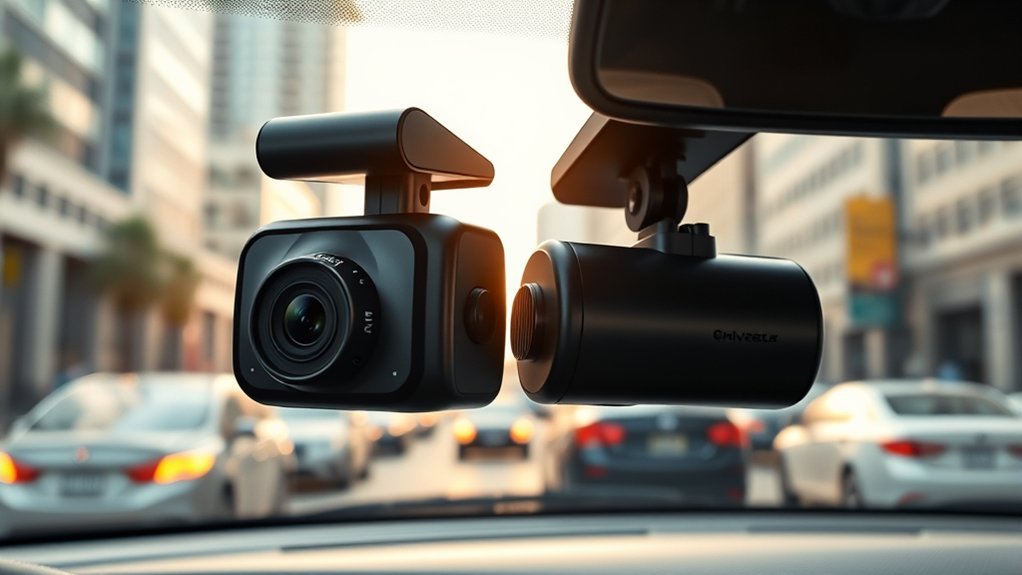
For 2026, a battery-powered, wireless front-and-rear dash cam kit should give you sharp front and rear clarity, long parking protection, and a simple app. Look for a model with a strong internal lithium cell or solar sync for multi-day event coverage, wide-angle lenses to cut blind spots, HDR/night vision, and reliable loop recording with motion/impact-triggered clips. Keep in mind that most “wireless” dash cams still need car power for continuous driving recording. Solar and battery power typically handle parking mode only. Check parking-mode behavior and mounting options so installation stays as cable-free as possible. Keep reading for specific model and setup tips.
| Wireless 4-Channel Front & Rear Dash Cam System | 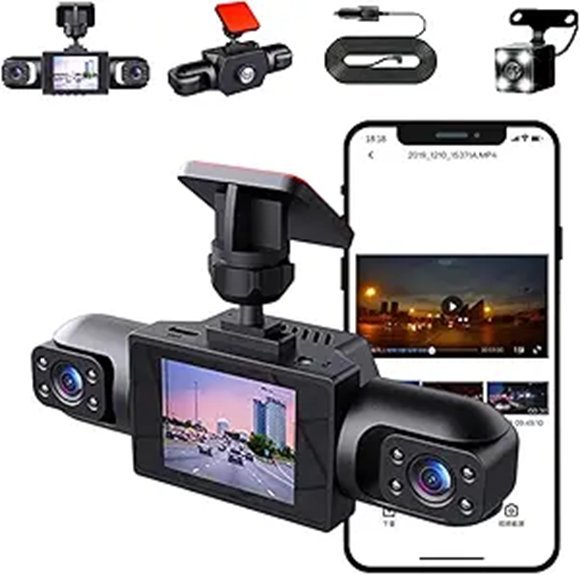 |
Best for Coverage | Front + Rear Recording: Four-channel recording (1080p front, 720p rear, 480p sides) | Night Vision: Infrared interior monitoring for low-light conditions | Power: Rechargeable with plug-in power for continuous recording | VIEW LATEST PRICE | Read Our Analysis |
| Baseus VD1 Pro 4K Front & 1080P Rear Dash Cam | 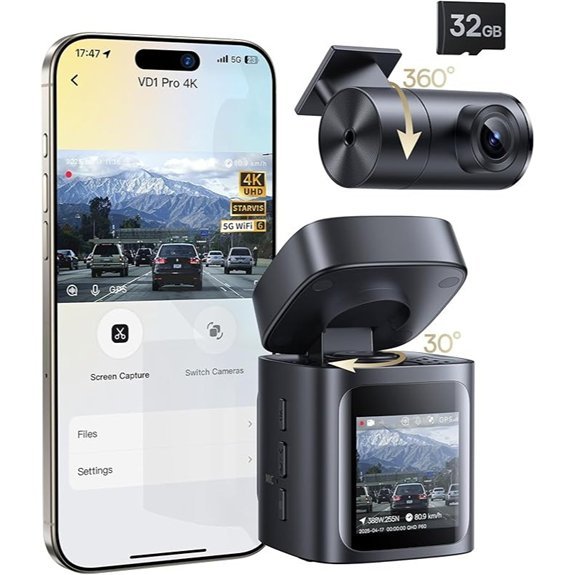 |
Best for Battery Parking | Front + Rear Recording: Dual recording — 4K front and 1080p rear | Night Vision: Sony IMX335 STARVIS sensor, f/1.6 lens for low-light/night clarity | Battery/Parking Protection: Built-in 380 mAh lithium battery + Solar Sync System 2.0 for up to 14 days parking protection | VIEW LATEST PRICE | Read Our Analysis |
More Details on Our Top Picks
-
Wireless 4-Channel Front & Rear Dash Cam System
Pick this if you want 360-degree coverage from a single unit. The wireless 4-channel system records front, rear, and both sides in 1080p front / 720p rear / 480p sides. The adjustable, rotatable side lenses help you minimize blind spots. Loop recording overwrites old files automatically, so you don’t have to manage storage. Infrared night vision captures interior details in low light, and the mobile app gives you real-time access and settings control. One thing to know: this unit runs on plug-in power for continuous recording, so it’s “wireless” in the sense that cameras communicate wirelessly, but you’ll still connect to your vehicle’s power supply for steady operation.
- Front + Rear Recording:Four-channel recording (1080p front, 720p rear, 480p sides)
- Night Vision:Infrared interior monitoring for low-light conditions
- Power:Rechargeable with plug-in power for continuous recording
- App Control / Connectivity:Mobile app control and monitoring via WiFi
- Loop Recording:Seamless loop recording that overwrites old footage
- Wide-Angle Lenses:170° front lens with 180° rotatable side lenses to reduce blind spots
- Additional Feature:G-sensor for impact-triggered file locking
- Additional Feature:Supports 12 languages
- Additional Feature:Four-channel simultaneous recording
-
Baseus VD1 Pro 4K Front & 1080P Rear Dash Cam
Pick this if parking protection without hardwiring matters most. The Baseus VD1 Pro’s Solar Sync System 2.0 plus a built-in 380 mAh lithium battery delivers up to 14 days of event-triggered parking coverage. In standby, it wakes to record 30-second clips when the G-sensor detects an impact, storing up to 20 incidents. You get 4K UHD HDR front and 1080p rear recording with 140°/120° lenses, capturing plates and signs day or night. The Sony IMX335 STARVIS sensor, 6-layer glass, and f/1.6 aperture improve low-light detail. Built-in 5GHz Wi-Fi 6 speeds up downloads, and the Baseus App handles previews, GPS data, OTA updates, and voice control. One important note: continuous driving recording still requires the included car charger cable. The rear camera also connects via cable. Solar and battery power handle parking mode only. Format the included 32GB microSD in-camera before use.
- Front + Rear Recording:Dual recording — 4K front (30 fps) and 1080p rear (25 fps)
- Night Vision:Sony IMX335 STARVIS sensor, f/1.6 six-element glass lens for low-light/night clarity
- Battery/Parking Protection:Built-in 380 mAh lithium battery + Solar Sync System 2.0 for up to 14 days parking protection (event-triggered, not continuous)
- App Control / Connectivity:Baseus app with 5GHz Wi‑Fi 6, video download, GPS view, OTA updates
- Loop Recording:Loop/event recording with 30‑second clips for collision events (continuous while powered)
- Wide-Angle Lenses:Wide-angle lenses (140° front, 120° rear)
- Additional Feature:4K UHD HDR front
- Additional Feature:Solar Sync System 2.0 + lithium battery
- Additional Feature:Voice control and hands-free operation
Factors to Consider When Choosing a Battery-Powered Wireless Front and Rear Dash Cam
You’ll want to check battery life range and how long parking mode records without draining the pack. Also compare video resolution, ease of installation, and whether the app and connectivity are reliable for live view and file transfer. These factors together determine how well the system protects your car and fits your daily routine.
Battery Life Range
Battery performance varies widely, so evaluate a dash cam’s stated runtime, parking-mode behavior, and real-world conditions before buying. Battery-powered dash cams can last from a few hours to several days depending on the model. Some units use built-in lithium batteries that claim up to 14 days of parking protection, but that usually means short clips (around 30 seconds) triggered by motion or impact. Continuous recording almost always needs a direct power connection. Don’t expect nonstop footage from battery-only setups. Solar integration can extend standby time during daylight hours. Compare manufacturer claims with user reports, and pick a model whose real-world endurance matches your parking and driving habits.
Parking Mode Performance
Once you’ve compared battery runtime, look at how a dash cam protects your parked car. You want one that records incidents while stationary, like collisions, vandalism, or suspicious activity, without draining the vehicle’s battery. Built-in batteries can offer limited parking protection, often up to about 14 days, but they usually support event-triggered clips rather than continuous recording. If you need nonstop surveillance, plan to hardwire the unit to the car’s power. Look for low-power standby modes and short automatic clips (around 30 seconds) triggered by impact or motion. These balance coverage and battery life. Also prioritize night-vision capability so recordings stay useful after dark. Choose a model whose parking behavior matches how and where you park.
Video Resolution Quality
Higher resolution directly affects your ability to read license plates, see road signs, and track details after an incident. Prioritize 4K UHD for the front camera so critical details stay legible. A 1080p rear camera provides solid coverage without eating through storage. Check lens specs too. Larger apertures and quality sensors like the Sony STARVIS line boost low-light performance, so night incidents aren’t unusable. Wide-angle lenses (120° to 170°) reduce blind spots and capture more context in each clip. Balancing resolution, sensor quality, and field of view gives you reliable footage when it counts.
Installation and Mounting
Great footage only helps if the cameras are mounted and aimed correctly. For a battery-powered, wire-free setup, you’ll want flexible mounting options that don’t require professional help or messy wiring. Choose between adhesive mounts or suction cups for a secure, low-profile fit on the windshield or dashboard. Position each camera to maximize visibility and reduce blind spots without blocking your view. Magnetic mounts are handy if you want quick detachment for charging or theft prevention. Before locking in placement, test recording angles from both seats so the front and rear units reliably capture plates and incidents.
App and Connectivity
You’ll likely use an app to monitor, download, and tweak settings from your phone, so pick a model with a reliable app and a clear interface. Look for built-in WiFi (5GHz is faster) for quicker transfers and live view. You must be within the camera’s WiFi range to connect. Some cameras support voice control for hands-free commands while driving. Check that the app shows GPS data, supports OTA firmware updates, and offers straightforward video management. Also look at the app’s update frequency and user reviews so you get ongoing improvements rather than neglected software.
Frequently Asked Questions
How Long Does the Battery Last in Cold Weather?
It drops considerably. You’ll usually get 30–60% of rated capacity in freezing temps, so expect only a few hours of continuous recording. Keeping the camera insulated or using a heated mount can help extend runtime.
Can the Dash Cam Connect to My Car’s Wi‑Fi Hotspot?
Yes, you can usually connect a dash cam to your car’s Wi‑Fi hotspot. It’ll stream footage, update firmware, and transfer files. Speeds and range depend on hotspot strength and camera compatibility.
Are Replacement Batteries Available for This Model?
Replacement batteries are available for many models from the manufacturer and authorized retailers. You’ll also find compatible third-party options online. Just check capacity, voltage, and connector type before buying.
Does the System Support Over-The-Air Firmware Updates?
Yes. The camera checks periodically, downloads securely over Wi‑Fi, and installs automatically or prompts you. This keeps features, stability, and security up to date without manual flashing.
Can I Hide Parking Mode Footage From Cloud Backups?
Yes, you can usually exclude parking mode clips from cloud backups. Most apps have a setting to prevent uploads, keeping those clips stored locally on your microSD card.
Conclusion
You want reliable, truly wireless front-and-rear coverage without bulky installs or constant charging. The Baseus VD1 Pro delivers sharp 4K front and 1080p rear footage with a compact, solar-assisted design that handles parking mode without hardwiring. The 4-channel system gives you broader coverage from all four sides. Balance battery life, parking mode, and app convenience, and choose what fits your actual routine. Both options offer solid hands-off protection that works when you’re away from your car.