A dash cam’s clip-length setting controls how continuous recording is divided into separate video files. It does not meaningfully change total recording time when the resolution, frame rate, bitrate, and number of cameras stay the same. For most drivers, 3-minute segments are the best starting point because they provide useful context without making individual files difficult to find, transfer, or protect.
Quick Answer
Use 3-minute dash cam clips for the best balance of context, file size, and easy review. Choose 1-minute clips when you want smaller files that are faster to transfer. Choose 5-minute clips when you prefer fewer files with more continuous context. Clip length does not substantially change total recording time at the same bitrate.
Last updated: July 31, 2026
Key Takeaways
- A 3-minute clip length is the most practical default for everyday driving.
- Shorter segments create smaller individual files, but they do not significantly extend total card retention.
- Resolution, total bitrate, frame rate, camera count, and card capacity control recording time.
- Save the event file and the clips immediately before and after it when preserving evidence.
- Parking monitoring usually requires constant power from a compatible hardwire kit.
What’s in This Article
- What Dash Cam Clip Length Actually Changes
- Best Dash Cam Clip Length Settings by Use Case
- How Dash Cam Storage Is Calculated
- How We Evaluated the Dash Cams
- Our Top Dash Cam Picks
- Factors to Consider When Choosing Clip Length
- How to Protect Important Dash Cam Clips
- Frequently Asked Questions
- Conclusion
What Dash Cam Clip Length Actually Changes
Loop recording divides a continuous drive into separate files, commonly in 1-, 3-, or 5-minute segments. When the memory card fills, the camera normally replaces the oldest unprotected files with new recordings.
The selected segment length changes:
- Individual file size: A 5-minute file is larger than a 1-minute file recorded at the same quality.
- Number of files: Shorter segments produce more files over the same drive.
- Transfer convenience: A 1-minute file is usually faster to download or share through a camera’s Wi-Fi connection.
- Review speed: Short clips can make a specific event easier to locate.
- Potential corruption loss: If one file becomes damaged, a shorter segment may limit how much footage is affected.
Clip length does not substantially change how many hours fit on a card when all recording-quality settings remain the same. One hour recorded at a combined bitrate of 40 Mbps uses about the same space whether the camera creates sixty 1-minute files, twenty 3-minute files, or twelve 5-minute files.
Note: Time-lapse parking recording is different. It records fewer frames and can reduce storage use, but that saving comes from the lower effective frame rate, not from the segment-length setting.
Best Dash Cam Clip Length Settings by Use Case
The best setting depends on how quickly you need to find, transfer, and protect footage. The table below offers a practical starting point.
| Use Case | Recommended Setting | Why It Works |
|---|---|---|
| Everyday commuting | 3 minutes | Balances useful context with manageable file sizes. |
| Fast accident-file transfer | 1 minute | Smaller files are quicker to preview, download, and send. |
| Long highway drives | 3 or 5 minutes | Longer files keep more surrounding road activity together. |
| Rideshare or delivery driving | 1 or 3 minutes | Makes passenger, traffic, and delivery events easier to isolate. |
| Slow camera-to-phone Wi-Fi | 1 minute | Reduces the size of each file that must be transferred. |
| Parking mode | Use the manufacturer default | Many cameras control parking-event length automatically or use a fixed buffer. |
Start with 3-minute segments and test the setting during a normal week. Move to 1 minute if app transfers feel slow or you frequently share individual events. Move to 5 minutes if you prefer fewer files and want more surrounding context in each one.
Pro Tip: When an incident happens near a segment boundary, preserve the event file plus the files immediately before and after it. The adjacent clips may contain the lead-up, impact, vehicle plate, or aftermath that the locked file does not show.
How Dash Cam Storage Is Calculated
Card capacity, total recording bitrate, camera count, resolution, frame rate, codec, and protected files determine how long footage remains available before loop recording replaces it.
A useful estimate is:
Recording hours ≈ card capacity in GB × 8,000 ÷ total bitrate in Mbps ÷ 3,600
For example, a 128GB card has a theoretical recording time of approximately:
- 11.4 hours at a total bitrate of 25 Mbps
- 7.1 hours at a total bitrate of 40 Mbps
- 5.7 hours at a total bitrate of 50 Mbps
Real retention will normally be lower because of file-system overhead, reserved space, protected event files, audio, metadata, and differences between advertised and usable card capacity.
A dual-camera or three-camera system usually has a higher combined bitrate than a front-only camera. This is why multi-channel recording often reduces total retention. Changing from 5-minute segments to 1-minute segments does not solve that issue. A larger supported card or a lower recording-quality setting has a much greater effect.
Choose a Card Suitable for Continuous Video
Use a reputable high-endurance microSD card that meets the dash cam manufacturer’s capacity and speed requirements. The SD Association’s video speed-class guidance explains that video devices need a dependable minimum sequential write speed to prevent recording problems.
Format the card through the dash cam rather than through a phone or unrelated device, and follow the manufacturer’s recommended formatting schedule. Replace the card if recordings become corrupted, files disappear, the camera repeatedly asks for formatting, or recording stops unexpectedly.
How We Evaluated the Dash Cams
The following products were compared using current manufacturer documentation and seller-listed specifications available on July 31, 2026. The evaluation considered recording channels, stated resolution, loop recording, card support, file-transfer options, GPS, parking-mode power requirements, and how easily a driver can retrieve short clips.
These are specification-based recommendations, not claims of hands-on testing. Manufacturer-listed resolution also does not guarantee readable license plates in every situation. Motion, focus, bitrate, lighting, windshield glare, exposure, sensor quality, and lens design all affect usable detail.
Affiliate Disclosure: As an Amazon Associate I earn from qualifying purchases. This does not affect the price you pay.
Our Top Dash Cam Picks
| ROVE R2-4K Dual Dash Cam with 128GB Card | 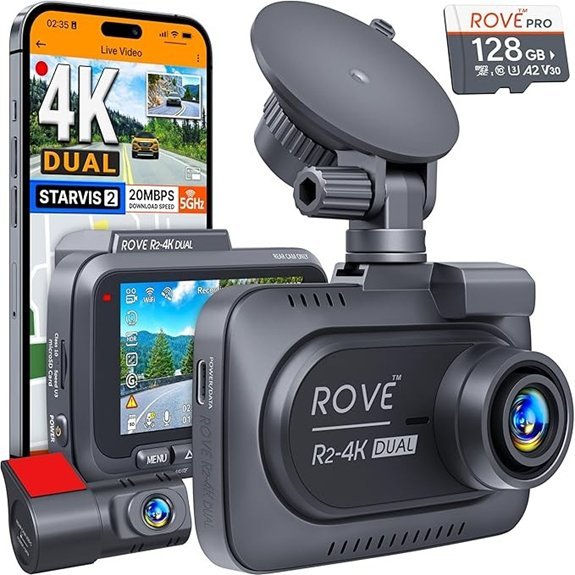 |
Best-Documented Features | Video Resolution: 3840×2160p front and 1920×1080p rear | Low-Light Hardware: Sony STARVIS 2 front sensor with HDR | Connectivity: Dual-band 5 GHz and 2.4 GHz Wi-Fi | Check Price on Amazon | Read Our Analysis |
| TERUNSOUL D016 4K Front and Rear Dash Cam | 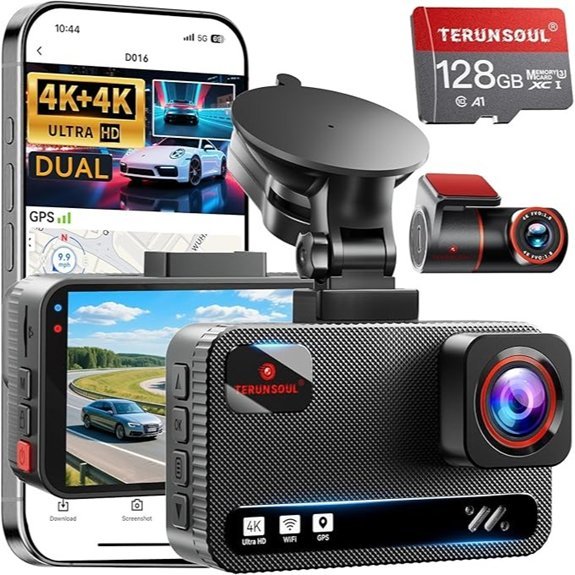 |
Dual-4K Option | Video Resolution: Manufacturer-listed 3840×2160p front and rear | Low-Light Features: Super Starlight mode and WDR | Connectivity: Dual-band 5.8 GHz and 2.4 GHz Wi-Fi | Check Price on Amazon | Read Our Analysis |
| TUISAU 3-Channel 4K Dash Cam with App Control | 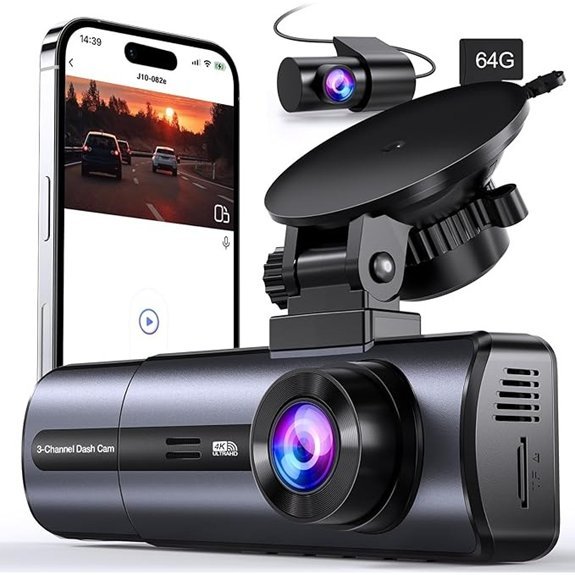 |
Cabin-Coverage Option | Video Modes: Seller-listed 4K front mode or 2.5K + 1080p + 1080p three-channel mode | Coverage: Front, cabin, and rear cameras | Connectivity: Seller-listed 5 GHz Wi-Fi and app control | Check Price on Amazon | Read Our Analysis |
More Details on Our Top Picks
-
ROVE R2-4K Dual Dash Cam with 128GB Card
Choose the ROVE R2-4K Dual Dash Cam if you want front and rear recording with a clearly documented feature set. According to the official ROVE specifications, it records 2160p front video with 1080p rear video and includes a 128GB ROVE PRO microSD card.
ROVE also lists a Sony STARVIS 2 front sensor, built-in GPS, a supercapacitor, dual-band Wi-Fi, app access, voice guidance, and support for cards up to 1TB. Smaller 1- or 3-minute files can be useful when transferring evidence through the app, but segment length will not substantially change total retention.
The advertised parking modes require a compatible ROVE hardwire kit. Without constant power, the camera cannot provide continuous monitoring after the vehicle is switched off.
Pick this if: You want a dual-channel model with included storage, GPS, well-documented specifications, and convenient phone access.
- Video Resolution:3840×2160p front and 1920×1080p rear at 30fps
- Low-Light Hardware:Sony STARVIS 2 front sensor with HDR
- Connectivity:Dual-band 5 GHz and 2.4 GHz Wi-Fi
- GPS Functionality:Built-in route, location, and speed logging
- Loop Recording:Automatically replaces the oldest unprotected files
- Parking Monitoring:Hardwire kit required
- Storage:128GB card included; manufacturer lists support up to 1TB
- Power:Supercapacitor
- Additional Feature:Voice guidance and app-based firmware updates
-
TERUNSOUL D016 4K Front and Rear Dash Cam
Consider the TERUNSOUL D016 if you want manufacturer-listed 4K recording from both the front and rear cameras. The official D016 specifications list dual 3840×2160p recording, GPS, dual-band 5.8 GHz and 2.4 GHz Wi-Fi, a G-sensor, WDR, and a 170-degree front view.
The documented package includes a 128GB card and supports storage up to 512GB. TERUNSOUL also lists 1-, 3-, and 5-minute loop options. Because simultaneous front and rear 4K files can have a high combined bitrate, use the largest compatible high-endurance card that fits your needs.
TERUNSOUL states that a separate hardwire kit is required for 24-hour parking monitoring. The hardwire system should include low-voltage protection to reduce the risk of draining the vehicle battery.
Pick this if: You want dual-channel 4K recording and are prepared for larger files and shorter card-retention time than many lower-bitrate systems.
- Video Resolution:Manufacturer-listed 3840×2160p front and rear
- Night Recording:Super Starlight mode with WDR
- Connectivity:Dual-band 5.8 GHz and 2.4 GHz Wi-Fi
- GPS Functionality:Built-in route, location, and speed data
- Loop Recording:Manufacturer lists 1-, 3-, and 5-minute segments
- Parking Monitoring:Separate hardwire kit required
- Viewing Angle:170-degree front lens
- Storage:128GB included; supports up to 512GB
- Warranty:Manufacturer-listed 18-month warranty
-
TUISAU 3-Channel 4K Dash Cam with App Control
The TUISAU 3-Channel Dash Cam is aimed at drivers who want front, cabin, and rear coverage. That configuration can be useful for rideshare work, passenger disputes, family driving, and incidents that a road-facing camera cannot capture.
The current seller title for ASIN B0FPQ9R94C lists a 4K front mode and a three-channel mode described as 2.5K front plus 1080p cabin and 1080p rear. It also lists 5 GHz Wi-Fi, app control, loop recording, night vision, a G-sensor, parking monitoring, and an included 64GB card.
An independent manufacturer page or official manual for this exact ASIN was not available during verification. GPS was not confirmed, so it should not be treated as an included feature. Check the live seller page for the current camera modes, card capacity, app name, warranty, and parking-power requirements before ordering.
Pick this if: Cabin recording is essential and you are comfortable relying on seller-listed specifications rather than a detailed manufacturer support page.
- Video Modes:Seller-listed 4K front mode or 2.5K + 1080p + 1080p three-channel mode
- Coverage:Front, cabin, and rear cameras
- Connectivity:Seller-listed 5 GHz Wi-Fi and app control
- GPS Functionality:Not confirmed for this exact ASIN
- Loop Recording:Seller-listed continuous loop recording
- Parking Monitoring:Seller-listed; confirm compatible constant-power requirements
- Night Recording:Seller-listed night-vision capability
- Storage:Seller-listed 64GB card included
- Verification:Exact specifications may change by seller or listing revision
Factors to Consider When Choosing Dash Cam Video Clip Length
Start with the way you expect to retrieve and use the footage. Clip length affects file handling and context, while recording quality and total bitrate control storage consumption.
Recording Purpose and Usage
For accident documentation, 1- or 3-minute segments are usually practical because individual files are quick to locate and transfer. A 3-minute setting normally captures enough surrounding road activity for an everyday incident without creating very large files.
Five-minute files can suit road trips or drivers who prefer fewer files. They provide more continuous context within each file, but they take longer to transfer and may be less convenient to share through a slow camera-to-phone connection.
Storage Capacity Considerations
Storage capacity controls how much footage can remain on the card before loop recording replaces old normal files. Resolution, total bitrate, frame rate, audio, codec, and camera count determine how quickly that capacity is used.
A front-and-rear system normally creates two synchronized video streams. A three-channel camera creates three. The combined bitrate of those streams matters far more than whether the camera divides them into 1-, 3-, or 5-minute files.
Event Duration and File Boundaries
A quick collision may fit inside one segment, while aggressive driving, a hit-and-run, or a dispute may span several files. Dash cams normally move from one loop file to the next without an intentional recording gap, but event-lock behavior varies by model.
A G-sensor may protect only the active file, an automatically generated event file, or more than one adjacent file. Do not assume the complete lead-up has been locked. Save the previous, current, and following files whenever possible.
Loop Recording Functionality
Loop recording allows the camera to continue recording after the memory card fills. The oldest unprotected files are replaced first. Protected or locked files are normally stored separately, but the protected area can eventually fill.
Check the protected folder regularly. Too many false G-sensor triggers from potholes, door slams, or hard braking can fill it with unneeded files and leave less usable space for normal recording.
Video Quality and Resolution
Higher resolution can preserve more detail, but resolution alone does not determine image quality. Bitrate, exposure, shutter speed, sensor performance, focus, compression, lens quality, windshield glare, weather, and vehicle speed all affect whether a plate or sign is readable.
A higher frame rate can improve motion sampling, while a higher bitrate can preserve more detail in each frame. Both may use more storage. Test your camera during daylight, at night, in rain, and on roads where vehicles move at realistic speeds.
User Preferences and Needs
Drivers who frequently download clips through an app may prefer 1-minute files. Drivers who review recordings from the card on a computer may find 3- or 5-minute files easier to organize.
Test each available setting before relying on the camera. Confirm that the timestamp is correct, the front and rear files stay synchronized, audio behaves as expected, and protected events can be opened on another device.
How to Protect Important Dash Cam Clips
Do not rely on the G-sensor alone after a crash, near miss, or parking incident. Automatic event detection can miss a light impact, lock only one segment, or create a file that does not include the full lead-up.
- Put safety first. Stop in a safe place and deal with injuries, traffic hazards, and emergency calls before handling the camera.
- Use the manual lock button when safe. This may protect the active segment from normal loop overwriting.
- Save adjacent files. Preserve the clip before the event, the active event clip, and the next clip.
- Copy the original files. Transfer them to a phone, computer, external drive, or secure cloud account.
- Keep an untouched copy. Do not trim, rename, recompress, or add captions to your only copy.
- Record basic details. Note the date, time, location, direction of travel, and which camera recorded each file.
- Check the recording. Confirm that the copied files open and include video, audio, timestamps, and any relevant GPS data.
Warning: Do not operate the dash cam, remove its memory card, or use its phone app while driving. Pull over safely before changing settings or transferring footage.
Pro Tip: Keep at least two copies of important evidence. Give an insurer, lawyer, police officer, or repair shop a copy rather than your only original card or file.
Frequently Asked Questions
Is a 1-, 3-, or 5-minute dash cam clip best?
Three minutes is the best default for most drivers. One-minute files are easier to download and share, while 5-minute files keep more continuous context together. Test the available options on your camera before choosing.
Do shorter dash cam clips save storage space?
Not in a meaningful way when the bitrate, resolution, frame rate, and camera count remain the same. Shorter segments produce more small files, while longer segments produce fewer large files. Total recording time per card stays approximately the same.
Can I customize video clip lengths on my dash cam?
Many models offer 1-, 3-, or 5-minute loop segments, but some use a fixed duration. Check the recording or loop-recording menu and confirm the supported settings in the manual for your exact model.
What happens if a crash occurs between two clips?
Dash cams normally record continuously when switching from one loop segment to the next. However, the G-sensor may protect only one file or a model-specific event window. Save the clips immediately before and after the event so you keep the full sequence.
What is the average lifespan of a dash cam?
There is no dependable universal lifespan. Heat exposure, power design, build quality, firmware support, vibration, and daily use all matter. A failing memory card can also look like a failing camera, so test the card before replacing the whole unit.
Do dash cams overwrite old footage automatically?
Most loop-recording dash cams replace the oldest unprotected files when storage fills. Locked files are usually protected, but the protected folder can also fill. Back up important footage promptly and clear unneeded locked clips after reviewing them.
Are there legal restrictions on dash cam footage?
Yes. Windshield mounting, audio consent, private-property recording, passenger notice, evidence handling, and public sharing rules can vary by state or country. The Reporters Committee’s recording guide summarizes U.S. recording laws, but it is not a substitute for legal advice.
Warning: If a dash cam records cabin audio, check the applicable consent laws before recording passengers. Consider disabling audio or providing clear notice when the legal requirements are uncertain.
Legal Disclaimer: This article is for general informational purposes and does not constitute legal advice. Laws governing mounting, video, audio, privacy, publication, and the use of footage as evidence vary by jurisdiction. Consult a qualified lawyer when legal rights or disputes are involved.
Conclusion
A 3-minute dash cam clip length is the best default for most drivers. It keeps individual files manageable while preserving enough context for ordinary traffic incidents. One-minute clips are useful for faster transfers, while 5-minute clips suit drivers who prefer fewer files with more continuous footage.
Remember that segment duration is not the main storage control. Card capacity, total bitrate, resolution, frame rate, codec, and camera count determine how many hours remain available before loop recording begins replacing old footage.
A March 27, 2026 AutoInsurance.com report based on a June 2025 survey of 989 licensed U.S. drivers found that 30% used dash cams and 70% thought they should be factory-installed in new vehicles.
That survey shows strong interest in recording technology, but a camera is only useful when it is configured, powered, maintained, and reviewed correctly. Use reliable loop recording, suitable high-endurance storage, a sensible G-sensor setting, and a tested method for saving important files.
Sources
- ROVE R2-4K Dual official product specifications — recording modes, storage, GPS, Wi-Fi, power design, and parking-mode requirements.
- TERUNSOUL D016 official product specifications — dual-camera resolution, loop settings, storage, GPS, warranty, and connectivity.
- BlackVue: Setting Recording Loop and Event Duration Times — differences between shorter and longer loop segments.
- SD Association Video Speed Class Standards — minimum sequential write performance for reliable video recording.
- Reporters Committee Recording Guide — U.S. audio, consent, and recording-law considerations.
- AutoInsurance.com Dash Cam Usage Report — 2026 report on U.S. dash cam adoption and consumer interest.